
High School and Beyond Plan
SchooLinks, a new High School and Beyond Plan (HSBP) platform
Beginning Sept. 2, 2026, SchooLinks will become Seattle Public Schools’ High School and Beyond Plan platform for students in grades 6–12.
This shift ensures alignment with state requirements while providing improved tools for students to explore their interests, plan for life after high school, and track progress toward their goals.
SchooLinks also expands access for families, creating new opportunities to engage in their student’s planning process.
Students who previously used Naviance will have extended access through Oct. 31 to retrieve and save existing materials created or uploaded in previous years.
The High School and Beyond Plan (HSBP) is a Washington State graduation requirement. As an important step in transitioning to life after high school, the HSBP helps students focus on setting goals, as well as preparation and readiness for future work, career and/or college.
Starting in middle school, students work with their families and school staff to develop their HSBP. Students continue to revise their plan each year through middle school and high school as their interests and/or goals change.
About SchooLinks
Seattle Public Schools has transitioned to SchooLinks, the district’s new High School and Beyond Plan platform for students in grades 6–12.
Beginning Sept. 2, students can use SchooLinks to:
- Complete High School and Beyond Plan activities.
- Explore careers and interests.
- Build and update graduation plans.
- Research colleges, apprenticeships, military service, and other postsecondary pathways.
- Search for scholarships and other opportunities.
- Track college and career planning activities.
For high school seniors, SchooLinks can also help students:
• Build and maintain a college application list
• Review college information and application deadlines
• Track school-provided application materials
• Request transcripts and teacher recommendations when their school uses CAM
• Connect SchooLinks with Common App when applicable
• Search for scholarships and other postsecondary opportunities
Naviance and SchooLinks Transition
- Naviance: Sept. 1–Oct. 31 — retrieve and save existing materials.
- SchooLinks: Beginning Sept. 2 — complete all current and future HSBP activities.
Important Dates for Students and Families
School counseling teams will work with students to discuss planning in SchooLinks.
Through Aug. 31
Sept. 1
Sept. 2
Oct. 31
Student Access and Support
Students can access SchooLinks beginning Sept. 2.
- Accounts are automatically created by Seattle Public Schools
- Students log in using their SPS username and password (through Clever or a school-provided link)
Student Login Instructions:
- Open the Clever Student Portal.
- Scroll to College Career Readiness.
- Favorite SchooLinks to keep it near the top of the Clever dashboard.
- Select the SchooLinks application.
First time using SchooLinks?
Watch this Getting Started video.
Students may be asked to complete introductory onboarding activities, including career-interest exploration. These activities help personalize career, college, and postsecondary planning resources within SchooLinks.
Students who previously used Naviance:
- Archived HSBP records: Historical HSBP task-completion records are available in SchooLinks under Documents. To view these records:
- Select Documents from the left navigation menu.
- Open the archived HSBP task-completion record.
- Transcripts: Transcripts were not transferred from Naviance to SchooLinks. See Students Applying to College below for transcript-request information.
- Résumés and other files: Naviance résumés and other student-created files were not transferred.
- Retrieve materials from Naviance: Students can access Naviance through Clever Sept. 1–Oct. 31 to download and save materials they want to keep.
- Do not complete new work in Naviance: This access is for retrieving existing materials only. Changes or new work will not be retained. Use SchooLinks beginning Sept. 2: Complete all current and future High School and Beyond Plan activities in SchooLinks.
Students Applying to College
SchooLinks can help high school seniors manage and track college application materials, including transcripts and letters of recommendation. Students should follow guidance from their school counseling team about their school’s college application process.
Important: Students still complete and submit their actual college applications through Common App, directly through a college’s website, or through another application platform. SchooLinks is used to coordinate school-provided documents and track the application process.
College Application FAQs for Students
Getting Started
Common App and SchooLinks
Transcripts and School Documents
Letters of Recommendation
Application Deadlines and Tracking
Before You Submit Your Applications
Before your college deadlines, make sure:
- Your Common App account is created, if applicable.
- Your high school information and FERPA Release Authorization are completed in Common App.
- Common App is connected to SchooLinks for Common App colleges.
- Every college requiring a transcript, recommendation, or other school-provided document is listed in SchooLinks.
- You have spoken with teachers and counselors before requesting recommendations.
- Recommendation requests are submitted 3–4 weeks before your deadlines when possible.
- You have verified each application deadline directly with the college.
Need Help?
Start with your school counseling team. College application procedures may vary by school, and your counselor can provide guidance about your school’s transcript, recommendation, and application-document processes.
For step-by-step instructions on using SchooLinks, students can also use the SchooLinks student support guides provided by SPS.
Student Resources – College Application Manager (CAM)
SchooLinks + Common App College Application Guide 2026–27 — Step-by-step SPS guide to Common App, SchooLinks, transcripts, recommendations, and application deadlines.
Student College Application Process Video — Quick walkthrough of the overall process.
Tracking College Applications in SchooLinks Presentation — Step-by-step instructions for Common App, SchooLinks setup, connecting accounts, recommendations, and tracking applications.
Student: College Application Manager Overview & Setup — Initial College Application Manager setup.
Student: Connect Your Common App Account — Connecting Common App and SchooLinks.
Students should also follow guidance from their school counseling team, as college application processes may vary by school.
Student Support
Students will receive support through:
- Classroom lessons connected to their High School and Beyond Plan
- Guidance from school counselors and staff
- Step-by-step tutorials and resources
Families will also receive information to help support students at home.
Parent/Guardian Access and Support
SchooLinks allows families to:
- View your student’s High School and Beyond Plan and progress
- Explore college and career options together
- Stay informed about important milestones and next steps
Resources for Parents/Guardians:
Login instructions:
Families can access SchooLinks beginning Sept. 2.
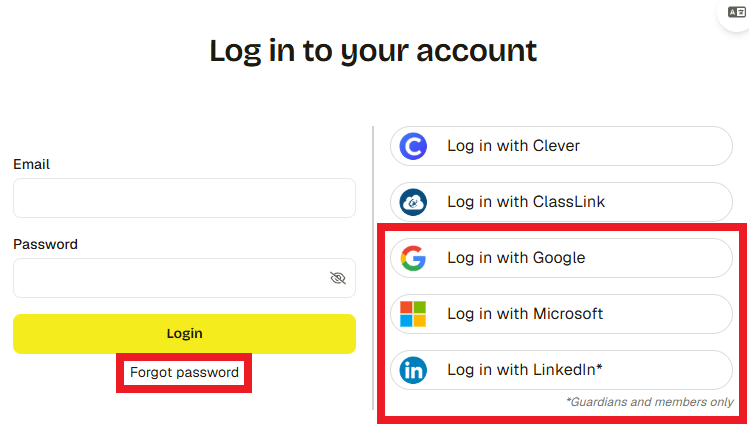
- Log in to SchooLinks using one of the options below:
- Click Login with Google, Microsoft, or LinkedIn if you have a Google, Microsoft, or LinkedIn email on file with the district.
- Click Forgot Password, enter the email you have on file with the district, then follow the email instructions to create a password.
- Once logged in, click the My students tab at the top to view your students.
- If you don’t see the right students, please reach out to the district for corrections.
- Click your student’s name to view their casefile. From the casefile you can see your student’s assessment results, review course plans, reach out to their counselor, and more!